
RustyMail - IMAP wrapper, and MCP server! (With a Web UI and Email Chatbot...)
TexasFortress.AI is proud to announce the open-source release of RustyMail
Github link: https://github.com/TexasFortress-AI/RustyMail
Features
🚀 High Performance: Built with Rust for speed and efficiency
🔒 Type Safety: Leverages Rust’s type system for reliability
📧 Full IMAP Support: Access all folders and messages with caching
🔄 Multiple Interfaces: REST API, Web Dashboard, MCP Stdio, MCP HTTP
👥 Multi-Account Support: Manage multiple email accounts with file-based configuration
💾 Smart Caching: Two-tier cache (SQLite + in-memory LRU) for fast email access
🎨 Modern Web UI: React-based dashboard with real-time updates
🤖 AI Integration: Built-in chatbot with support for 10+ AI providers
🔐 Secure: TLS support and API key authentication
📊 Monitoring: Real-time metrics and health monitoring
🧪 Comprehensive Testing: Unit, integration, and E2E tests
🧩 Extensible: Easily add new MCP tools
🛠️ MCP Protocol: Full JSON-RPC 2.0 support over stdio and Streamable HTTP transports
⚡ Process Management: PM2 integration for reliable service management
Low Level Tools
{
  “mcpServers”: {
    “rustymail-low-level”: {
      “command”: “/absolute/path/to/RustyMail/target/release/rustymail-mcp-stdio”,
      “env”: {
        “MCP_BACKEND_URL”: “http://localhost:9437/mcp”,
        “MCP_TIMEOUT”: “30”,
        “RUSTYMAIL_API_KEY”: “your-api-key-from-.env”
      }
    }
  }
}
High-Level MCP Variant (Recommended for AI Agents)
Best for AI-powered workflows with natural language email management and reduced context pollution.
Features:
🤖 AI-Powered Drafting: Generate email replies and compositions using configurable AI models
🔍 Intelligent Workflows: Process complex email instructions in natural language
📉 Reduced Context: Only 12 tools (vs 26+) to minimize Claude’s context usage
⚙️ Configurable Models: Separate models for tool calling (routing) and drafting (composition)
Setup:
Build the high-level MCP adapter:
cargo build --release --bin rustymail-mcp-stdio-high-levelConfigure AI models (first-time setup):
The high-level variant uses two AI roles:
Tool-calling model (e.g.,
hf.co/unsloth/GLM-4.7-Flash-GGUF:q8_0) - Routes tasks and calls toolsDrafting model (e.g.,
gemma3:27b-it-q8_0) - Generates email content
Configure via Claude Desktop using the MCP tools:
"Set tool calling model to ollama hf.co/unsloth/GLM-4.7-Flash-GGUF:q8_0 at http://localhost:11434"
"Set drafting model to ollama gemma3:27b-it-q8_0 at http://localhost:11434"
Add high-level variant to Claude Desktop config:
{
  “mcpServers”: {
    “rustymail”: {
      “command”: “/absolute/path/to/RustyMail/target/release/rustymail-mcp-stdio-high-level”,
      “env”: {
        “MCP_BACKEND_URL”: “http://localhost:9437/mcp”,
        “MCP_TIMEOUT”: “120”,
        “RUSTYMAIL_API_KEY”: “your-api-key-from-.env”
      }
    }
  }
}
Using Both Variants Together
You can configure both variants in Claude Desktop to access different tool sets:
{
  "mcpServers": {
    "rustymail-low-level": {
      "command": "/path/to/rustymail-mcp-stdio",
      "env": {
        "MCP_BACKEND_URL": "http://localhost:9437/mcp",
        "MCP_TIMEOUT": "30",
        “RUSTYMAIL_API_KEY”: “your-api-key-from-.env”
      }
    },
    "rustymail": {
      "command": "/path/to/rustymail-mcp-stdio-high-level",
      "env": {
        "MCP_BACKEND_URL": "http://localhost:9437/mcp",
        "MCP_TIMEOUT": "120",
        “RUSTYMAIL_API_KEY”: “your-api-key-from-.env”
      }
    }
  }
}
High-Level Tools Reference
AI-Powered Tools
process_email_instructions- Execute complex email workflows from natural languageExample: “Find all unread emails from john@example.com in the last week and draft replies”
Uses sub-agent with iterative tool calling
MAX_ITERATIONS: 10 to prevent infinite loops
draft_reply- Generate AI-powered email replyFetches original email
Generates contextual reply using drafting model
Automatically saves draft to INBOX.Drafts folder with
\DraftflagParameters:
email_uid,folder,account_id,instruction(optional)
draft_email- Generate new email from scratchCreates email based on recipient, subject, and context
Uses drafting model for generation
Automatically saves to INBOX.Drafts folder
Parameters:
to,subject,context,account_id
Browsing Tools (Read-Only)
list_accounts- List configured email accountslist_folders_hierarchical- Get folder tree structurelist_cached_emails- List emails with pagination (supports 30,000+ email folders)get_email_by_uid- Fetch specific email by UIDsearch_cached_emails- Search emails by subject/sender/dateget_folder_stats- Get folder statistics (total, unread)
Configuration Tools
get_model_configurations- View current AI model settingsset_tool_calling_model- Configure routing model (provider, model name, API key)set_drafting_model- Configure email generation model
Usage Examples
Standard Variant:
"List my email folders"
"Show me unread emails in my inbox"
"Move email UID 123 from INBOX to Archive"
"Mark emails 100-105 as read"
High-Level Variant:
"Draft a reply to the email from john@example.com thanking him for the update"
"Generate a professional email to shannon@texasfortress.ai about the project status"
"Process my unread emails: draft replies to questions, archive newsletters"
"What's in my Drafts folder?"
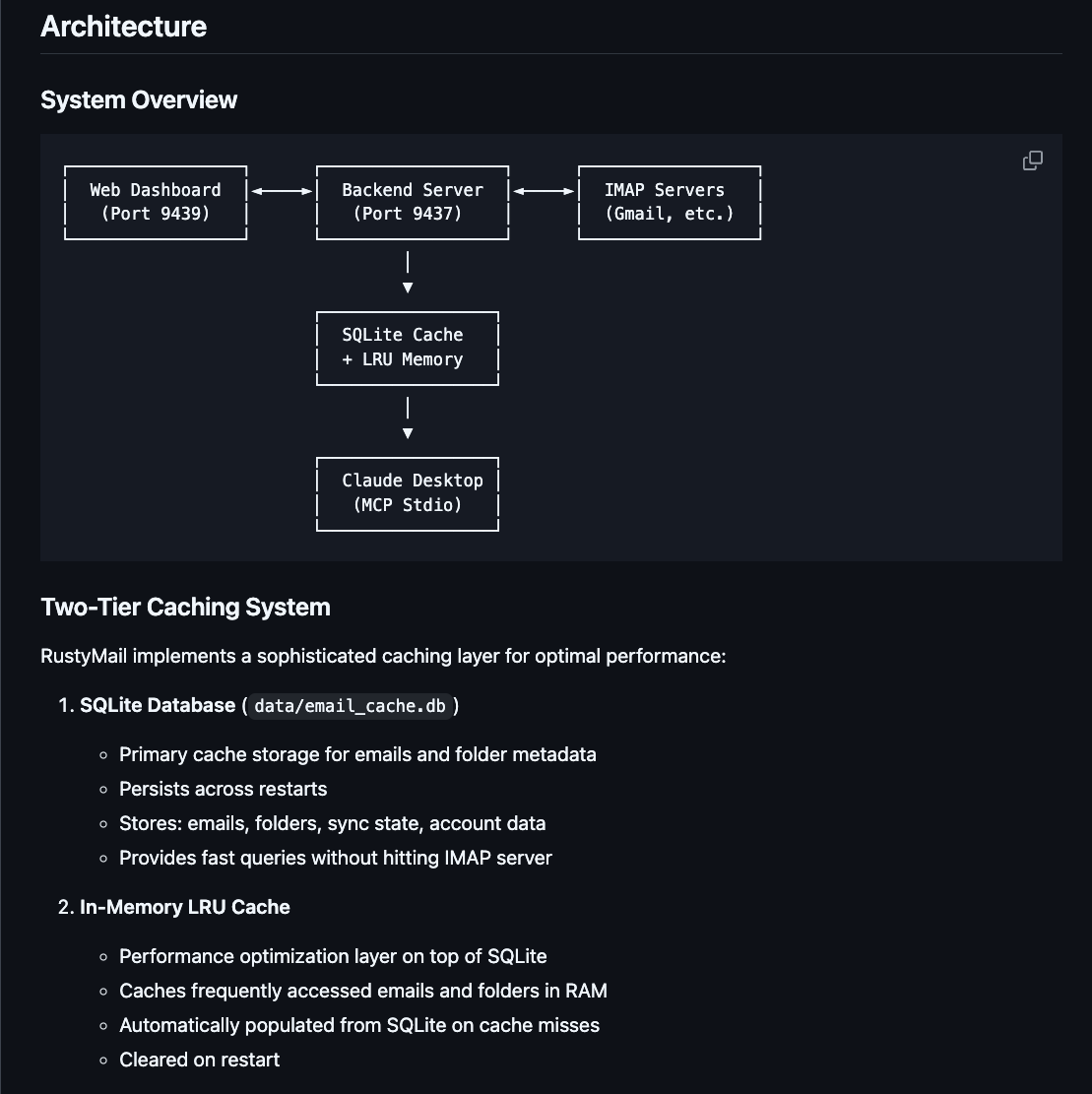
Architecture
┌─────────────────┐     JSON-RPC      ┌──────────────────────┐
│ Claude Desktop  │◄──── (stdio) ────►│  rustymail-mcp-stdio │
└─────────────────┘                   └──────────────────────┘
                                               │
                                               │ HTTP
                                               ▼
                                      ┌──────────────────┐
                                      │ Backend Server   │
                                      │ /mcp endpoint    │
                                      │ (Port 9437)      │
                                      └──────────────────┘
The stdio adapter acts as a thin proxy, forwarding JSON-RPC requests from Claude Desktop to the backend server’s HTTP /mcp endpoint.
Streamable HTTP Example (JavaScript)
// Send JSON-RPC request to MCP endpoint
async function callMcpTool(method, params = {}) {
  const response = await fetch(’http://localhost:9437/mcp’, {
    method: ‘POST’,
    headers: {’Content-Type’: ‘application/json’},
    body: JSON.stringify({
      jsonrpc: ‘2.0’,
      id: Date.now(),
      method: method,
      params: params
    })
  });
  return await response.json();
}

// Example: List all folders
const result = await callMcpTool(’list_folders’);
console.log(’Folders:’, result.result.folders);
Configuration
Environment Variables
Edit .env file (see .env.example for full options):
# Server Ports (use uncommon ports to avoid conflicts)
REST_PORT=9437         # Backend REST API + MCP Streamable HTTP
DASHBOARD_PORT=9439    # Frontend dashboard

# Database
CACHE_DATABASE_URL=sqlite:data/email_cache.db

# Authentication
RUSTYMAIL_API_KEY=your-api-key-here

# Logging
LOG_LEVEL=info

# AI Providers (optional, for chatbot)
# OPENAI_API_KEY=sk-...
# ANTHROPIC_API_KEY=sk-ant-...
# OPENROUTER_API_KEY=sk-or-...
# (See .env.example for all 10+ supported providers)
Account Configuration
Accounts are stored in config/accounts.json (file-based, not in .env):
{
  “accounts”: [
    {
      “id”: “user@example.com”,
      “name”: “Work Email”,
      “imap”: {
        “host”: “imap.example.com”,
        “port”: 993,
        “username”: “user@example.com”,
        “password”: “your-password”,
        “use_tls”: true
      },
      “smtp”: {
        “host”: “smtp.example.com”,
        “port”: 587,
        “username”: “user@example.com”,
        “password”: “your-password”,
        “use_tls”: true
      },
      “is_default”: true
    }
  ]
}
Create this file in config/accounts.json to manage multiple email accounts.
Documentation
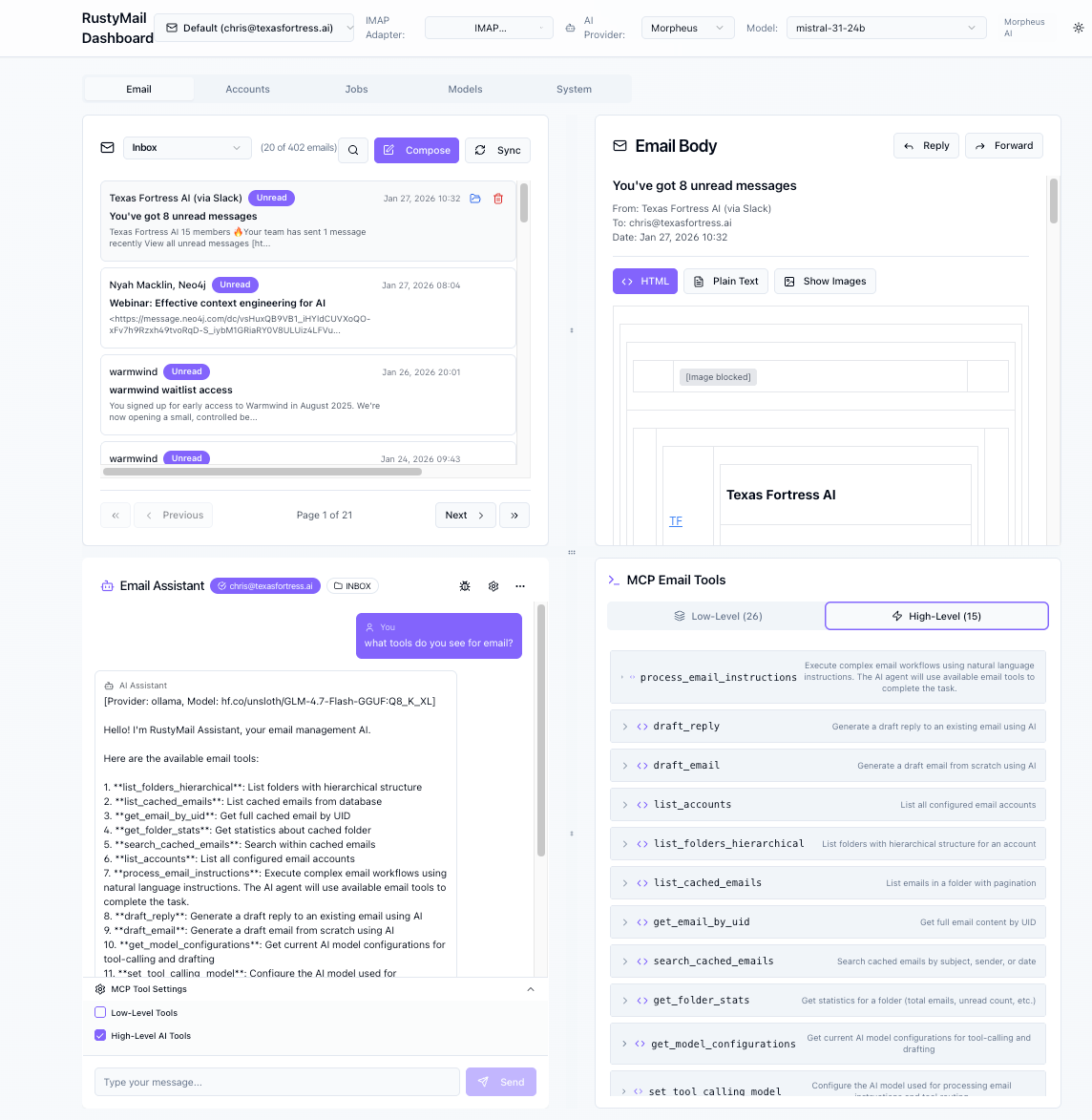
Web Dashboard
RustyMail includes a modern React-based dashboard for managing emails and monitoring the server.
Features
📧 Email Management: Browse, search, and manage emails across multiple accounts
🤖 AI Chatbot: Natural language interface with 10+ AI provider support
📊 Real-time Monitoring: Live server metrics via Server-Sent Events
👥 Multi-Account: Switch between configured email accounts
🎨 Modern UI: Built with React, TypeScript, and shadcn/ui components
🔄 Smart Caching: Displays cached emails for instant loading
Accessing the Dashboard
Ensure services are running (see “Running with PM2” above)
Open your browser to: http://localhost:9439
The dashboard will automatically connect to the backend at port 9437
Dashboard Development
For frontend developers working on the UI:
cd frontend/rustymail-app-main

# Install dependencies
npm install

# Start development server with hot-reload
npm run dev

# Build for production
npm run build
Environment Variables: The frontend automatically loads environment variables from the project root .env file via dotenv-cli. No separate frontend .env file is needed.
Dashboard Architecture
Frontend: React + TypeScript + Vite (port 9439)
Backend API: Rust + Actix-web (port 9437)
Real-time Updates: Streamable HTTP + WebSocket connections
State Management: React Context API
UI Components: shadcn/ui + Tailwind CSS
Architecture
System Overview
┌─────────────────┐      ┌──────────────────┐      ┌─────────────────┐
│  Web Dashboard  │◄────►│  Backend Server  │◄────►│  IMAP Servers   │
│   (Port 9439)   │      │   (Port 9437)    │      │  (Gmail, etc.)  │
└─────────────────┘      └──────────────────┘      └─────────────────┘
                                  │
                                  ▼
                         ┌─────────────────┐
                         │  SQLite Cache   │
                         │  + LRU Memory   │
                         └─────────────────┘
                                  │
                                  ▼
                         ┌─────────────────┐
                         │  Claude Desktop │
                         │   (MCP Stdio)   │
                         └─────────────────┘
Two-Tier Caching System
RustyMail implements a sophisticated caching layer for optimal performance:
SQLite Database (
data/email_cache.db)Primary cache storage for emails and folder metadata
Persists across restarts
Stores: emails, folders, sync state, account data
Provides fast queries without hitting IMAP server
In-Memory LRU Cache
Performance optimization layer on top of SQLite
Caches frequently accessed emails and folders in RAM
Automatically populated from SQLite on cache misses
Cleared on restart
Cache Flow: Memory → SQLite → IMAP (fallback chain)
When accessing emails:
First checks RAM cache (fastest)
Falls back to SQLite query if not in RAM
Only queries IMAP if not in cache at all
Automatically populates caches on successful retrieval
This architecture ensures:
⚡ Sub-millisecond access to cached emails
💾 Minimal IMAP server load
🔄 Automatic cache synchronization
📊 Efficient handling of large mailboxes
Multi-Account Support
Accounts are managed through config/accounts.json:
File-based configuration (not environment variables)
Support for multiple IMAP/SMTP accounts
Per-account caching and folder management
Account switching via MCP tools or REST API
AI Providers
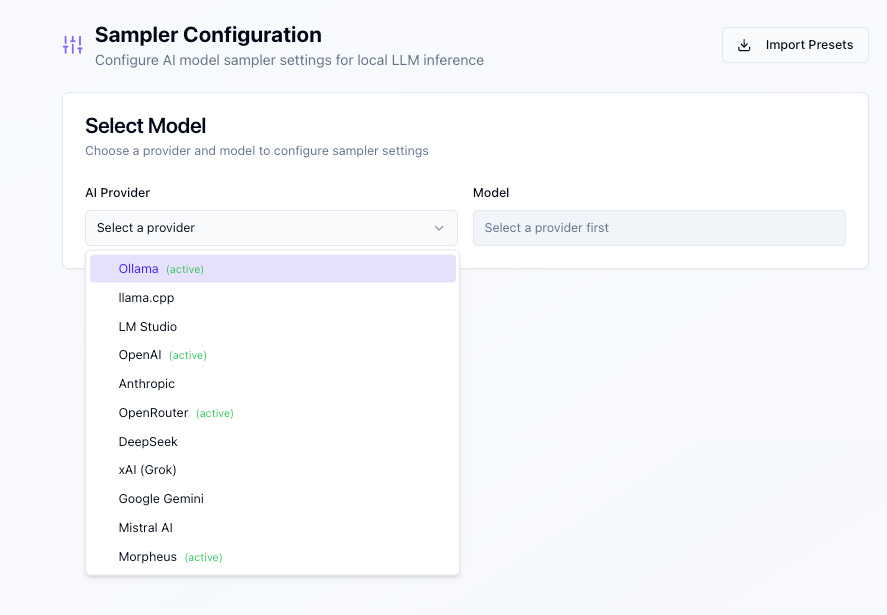
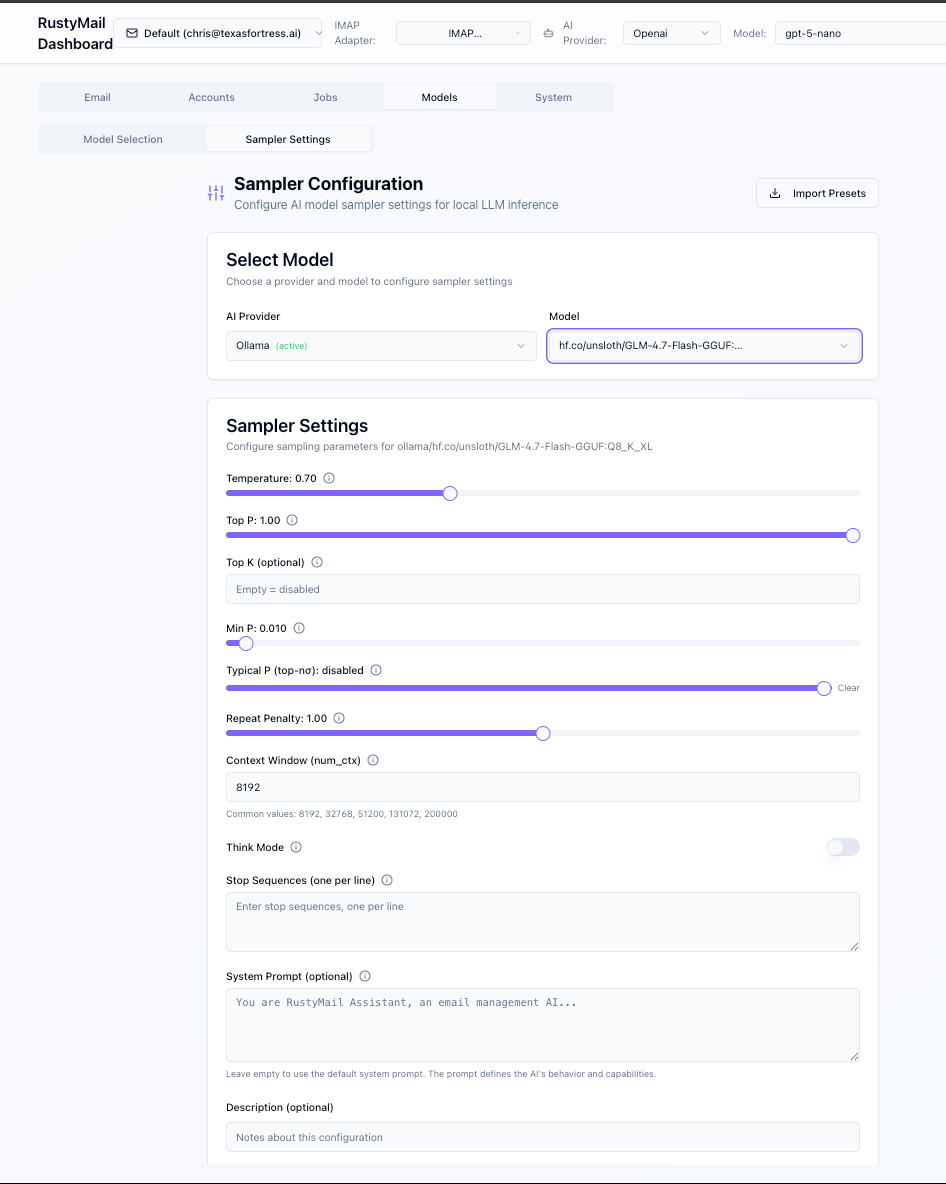
Sampler Settings
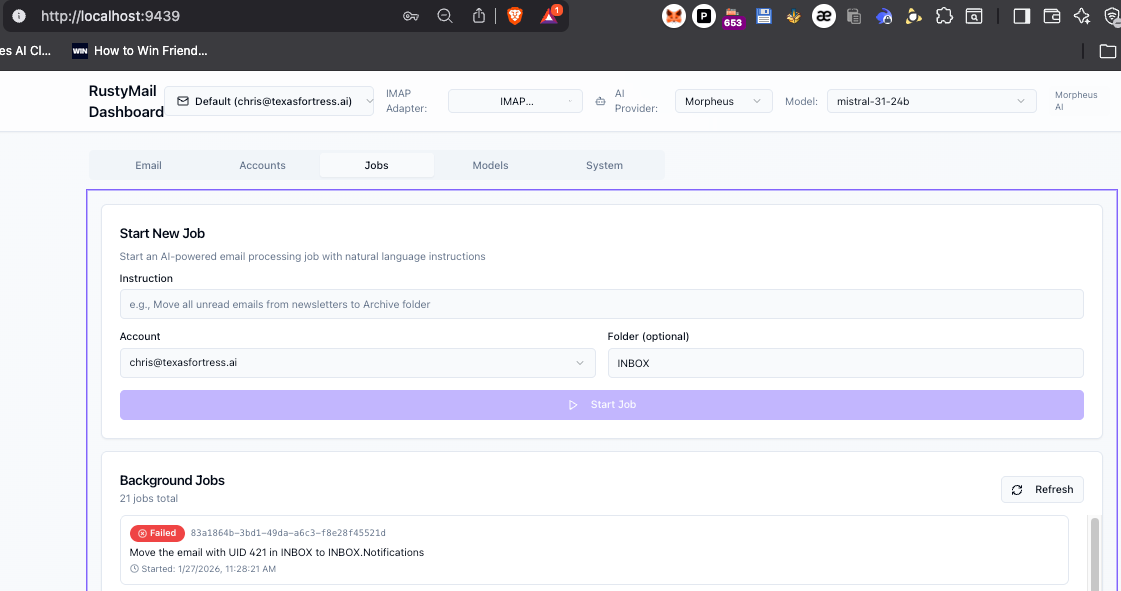
Jobs
Quick Start
Prerequisites
Rust 1.70+ - Install from rust-lang.org
Node.js 18+ (for dashboard) - Install from nodejs.org
PM2 (optional, for process management) -
npm install -g pm2OpenSSL or compatible SSL library
An IMAP email account (Gmail, Outlook, etc.)
Installation
git clone https://github.com/rangersdo/rustymail.git
cd rustymail

# Copy and configure environment variables
cp .env.example .env
# Edit .env with your configuration (ports, API keys, etc.)

# Build all components
cargo build --release --bin rustymail-server
cargo build --release --bin rustymail-mcp-stdio

# Build frontend dashboard
cd frontend/rustymail-app-main
npm install
npm run build
cd ../..
Running with PM2 (Recommended)
PM2 provides reliable process management with auto-restart on crashes:
# Start all services (backend + frontend)
pm2 start ecosystem.config.js

# Save process list (survives reboots)
pm2 save

# View status
pm2 status

# View logs
pm2 logs

# Restart services
pm2 restart all

# Stop services
pm2 stop all
Running Manually
Backend Server (REST API + MCP HTTP, port 9437):
./target/release/rustymail-serverFrontend Dashboard (port 9439):
cd frontend/rustymail-app-main
npm run dev
MCP Stdio Adapter (for Claude Desktop integration):
./target/release/rustymail-mcp-stdioQuick Rebuild Command
Use the Claude Code slash command for complete rebuild:
/rebuild-allThis command stops services, rebuilds all components, and restarts with PM2.
Interface Usage
REST API
Server runs at
http://localhost:9437
Example requests:
# List folders
curl -X GET http://localhost:9437/folders -H “Authorization: Basic $(echo -n ‘user:pass’ | base64)”

# List emails in INBOX
curl -X GET http://localhost:9437/emails/INBOX -H “Authorization: Basic $(echo -n ‘user:pass’ | base64)”

# Send email via SMTP
curl -X POST http://localhost:9437/api/dashboard/emails/send \
  -H “Content-Type: application/json” \
  -d ‘{
    “to”: [”recipient@example.com”],
    “cc”: [”cc@example.com”],
    “bcc”: [”bcc@example.com”],
    “subject”: “Test Email”,
    “body”: “Plain text body”,
    “body_html”: “<p>HTML body (optional)</p>”
  }’
SMTP Send Email Parameters:
to(required): Array of recipient email addressescc(optional): Array of CC recipientsbcc(optional): Array of BCC recipientssubject(required): Email subject linebody(required): Plain text email bodybody_html(optional): HTML version of the email bodyaccount_email(query param, optional): Specify which account to send from (defaults to primary account)
MCP Stdio
cargo run --release -- --mcp-stdioSend JSON-RPC requests via stdin:
{”jsonrpc”:”2.0”,”id”:1,”method”:”imap/listFolders”,”params”:{}}MCP Streamable HTTP
The Streamable HTTP transport is available on the same port as REST (9437).
Endpoint: http://localhost:9437/mcp
Send JSON-RPC requests via HTTP POST:
curl -X POST http://localhost:9437/mcp \
  -H “Content-Type: application/json” \
  -d ‘{
    “jsonrpc”: “2.0”,
    “id”: 1,
    “method”: “tools/list”,
    “params”: {}
  }’
Example response:
{
  “jsonrpc”: “2.0”,
  “id”: 1,
  “result”: {
    “tools”: [
      {
        “name”: “list_accounts”,
        “description”: “List all configured email accounts”,
        “inputSchema”: {}
      }
    ]
  }
}
MCP Protocol Specification
RustyMail implements the Model Context Protocol (MCP) over stdio and Streamable HTTP transport (MCP 2025-03-26).
JSON-RPC 2.0 Format
Request:
{
  “jsonrpc”: “2.0”,
  “id”: “unique-id”,
  “method”: “imap/listFolders”,
  “params”: {}
}
Success Response:
{
  “jsonrpc”: “2.0”,
  “id”: “unique-id”,
  “result”: { “folders”: [”INBOX”, “Sent”] }
}
Error Response:
{
  “jsonrpc”: “2.0”,
  “id”: “unique-id”,
  “error”: { “code”: -32001, “message”: “IMAP authentication failed” }
}
Error Codes
-32700Parse error-32600Invalid request-32601Method not found-32602Invalid params-32603Internal error-32000IMAP connection error-32001Authentication failure-32002Folder not found-32003Folder already exists-32004Email not found-32010IMAP operation failed
Supported MCP Tools
Account Management
list_accounts- List all configured email accountsset_current_account- Set the active account for operations
Folder Operations
list_folders- List all folders for current accountlist_folders_hierarchical- Get folder tree structure
Email Operations (IMAP)
search_emails- Search emails with IMAP queriesfetch_emails_with_mime- Fetch emails with full MIME contentatomic_move_message- Move single message atomicallyatomic_batch_move- Batch move multiple messagesmark_as_read- Mark messages as read (add \Seen flag)mark_as_unread- Mark messages as unread (remove \Seen flag)mark_as_deleted- Mark emails for deletiondelete_messages- Permanently delete messagesundelete_messages- Restore deleted messagesexpunge- Permanently remove deleted messages
Email Operations (Cache)
list_cached_emails- List emails from local cache (fast)get_email_by_uid- Get specific email by UIDget_email_by_index- Get email by index in foldercount_emails_in_folder- Get email count for folderget_folder_stats- Get folder statistics (total, unread, size)search_cached_emails- Search cached emails (fast, local)
Note: Cache operations are significantly faster as they query the local SQLite database instead of the remote IMAP server.
Email Sending (SMTP)
send_email- Send email via SMTP with to/cc/bcc/subject/body parameters
Attachment Operations
list_email_attachments- List all attachments in an emaildownload_email_attachments- Download email attachments to local storagecleanup_attachments- Clean up downloaded attachment files
Development
Run Tests
cargo testRun Benchmarks
cargo benchLint
cargo clippyContributing
Contributions welcome! Please see CONTRIBUTING.md.
License
MIT License. See LICENSE.
Authors
Steve Olson - GitHub
Contact: steve@texasfortress.ai
Chris Odom - GitHub
Contact: chris@texasfortress.ai

TexasFortress.AI
See our AGI Articles:
Pondering AGI

Pondering AGI Part 2

Pondering AGI Part 3

Part 4 coming soon!
Sponsors
Sponsored by Texas Fortress AI.